

Before you begin
You need:- A workspace with at least one finished call. The quickstart makes one in a few minutes.
- For the SDK or the CLI: an API key and Node.js 22 or later. The quickstart shows how to install both and sign in.
What’s in a record
A record is a vCon, an open JSON format for conversations. Fonoster writes version0.4.0 of the format.
fonoster.missing lists what the record lacks: hangup when the call’s end was never seen (the
record was sealed shortly after its last entry), or recording when a recording was asked for and
none was made.
A record doesn’t include logs, the language model’s prompts and responses, or SIP traces. A call
that never reached an application, because it was busy, wasn’t answered or was rejected, gets a
shorter record with the failure reason.
Versions
A record is sealed when the call ends, as version 1. A sealed version is never edited. When something changes later, such as a part being deleted, Fonoster seals a new version that points to the one before it. Reads return the latest version unless you ask for another.Two copies: redacted and original
Each version comes in two copies:- Redacted, the copy you get by default. Payment card numbers, as digits or as number words in
English or Spanish, are replaced with
[card number]in the transcript, the turn decisions and the notes. It has nomessages.ndjson. When a card number was redacted, the recording in this copy has a beep over it. If Fonoster can’t find the redacted words in the audio, this copy leaves the recording out and setsfonoster.recordingWithheld. - Original, unredacted, with
messages.ndjsonand the recording without beeps. Only workspace owners and admins can read it.
Redaction only finds card numbers. Other personal data, such as names or
addresses, isn’t masked.
How a record is signed
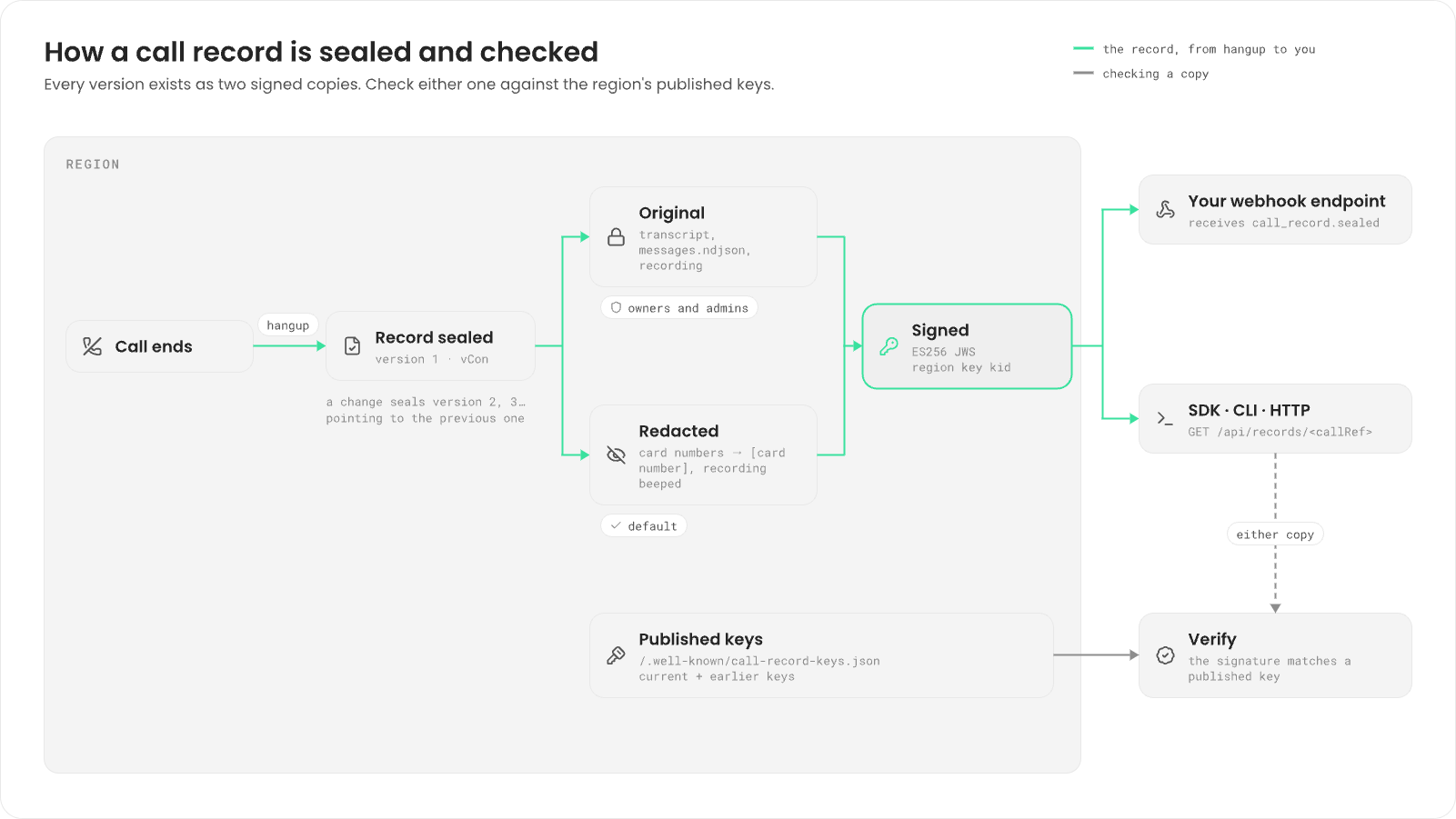
/.well-known/call-record-keys.json, including old keys, so records signed before a
key change still verify.
Records stay in the region where the call ran.
Know when a record is ready
Subscribe a webhook tocall_record.sealed. Fonoster sends it for every new
version of a record:
recordUrl is the record’s path on the API. When it’s a path, add your API’s address in front, such
as https://api.fonoster.ai. The event never carries the transcript or the recording.
Find records
- Dashboard
- SDK
- CLI
Go to Calls. Each row is a call, newest first. Open one to read its turns and its turn
decisions. The dashboard shows the redacted copy.
Get a record
- Dashboard
- SDK
- CLI
In Calls, open the call. The page header shows who called, the application, the length, why
the call ended, and the record’s version.
--original and { original: true } need the owner or admin role. Without it, the request is
refused with 403.
Download the recording
The recording is a stereo WAV file at 16 kHz: the caller on the left channel, your application on the right. There’s a recording only when the call’s recording policy was on. See Record calls and ask for consent.- Dashboard
- SDK
- CLI
Open the call in Calls and choose Download recording, then Save recording. When
there’s none, the page shows No recording.
--original (CLI) or { original: true } (SDK) for the recording without beeps. If the redacted
copy withheld the recording, only the original has it.
Use the HTTP API
The SDK and the CLI call these HTTP endpoints, which you can also call directly. Send your access token and your workspace with every request:client.getAccessToken() returns the token after you sign in.
This request fetches a record:
Verify a record
Verification proves that a record and its recording are exactly what the region signed. You check two things: the signature over the vCon, and the hash of each file it points to.1
Download the signed record and its recording
Download the same copy of both. For the redacted copy:For the original, add
--original to both commands.2
Check the signature and the recording
The signed record is a JWS in JSON form. Its protected header holds Run it next to the two files:
alg (ES256), typ
(vcon+jws), kid, the ID of the signing key, and jku, the URL of the region’s key set.This script fetches the key set from jku, picks the key whose kid matches, checks the
signature, then compares the recording’s SHA-512 hash with the one in the vCon:verify-record.js
The record and its recording are exactly what the region signed.
sha512- followed by the base64url SHA-512 of the file. The original copy also
points to messages.ndjson in attachments, with its own content_hash, which you can check the
same way. File urls in the vCon are relative, such as parts/recording.wav; download the files
through the API.
A record proves it matches the key set its region publishes. The key isn’t backed by a certificate
chain or an outside timestamp, so you trust the region’s published keys.
CallRecords in the Node SDK reference.
Next steps
Retention and erasure
Delete recordings after a number of days, or erase one call.
Record calls and ask for consent
Turn recording on, off, or on with consent.
Webhooks
Get
call_record.sealed when a record is ready.Node SDK
Every
CallRecords method.