

transfer tool. A stream transfers with the Voice
SDK, and can also brief the operator before connecting the caller.
Pick a transfer mode
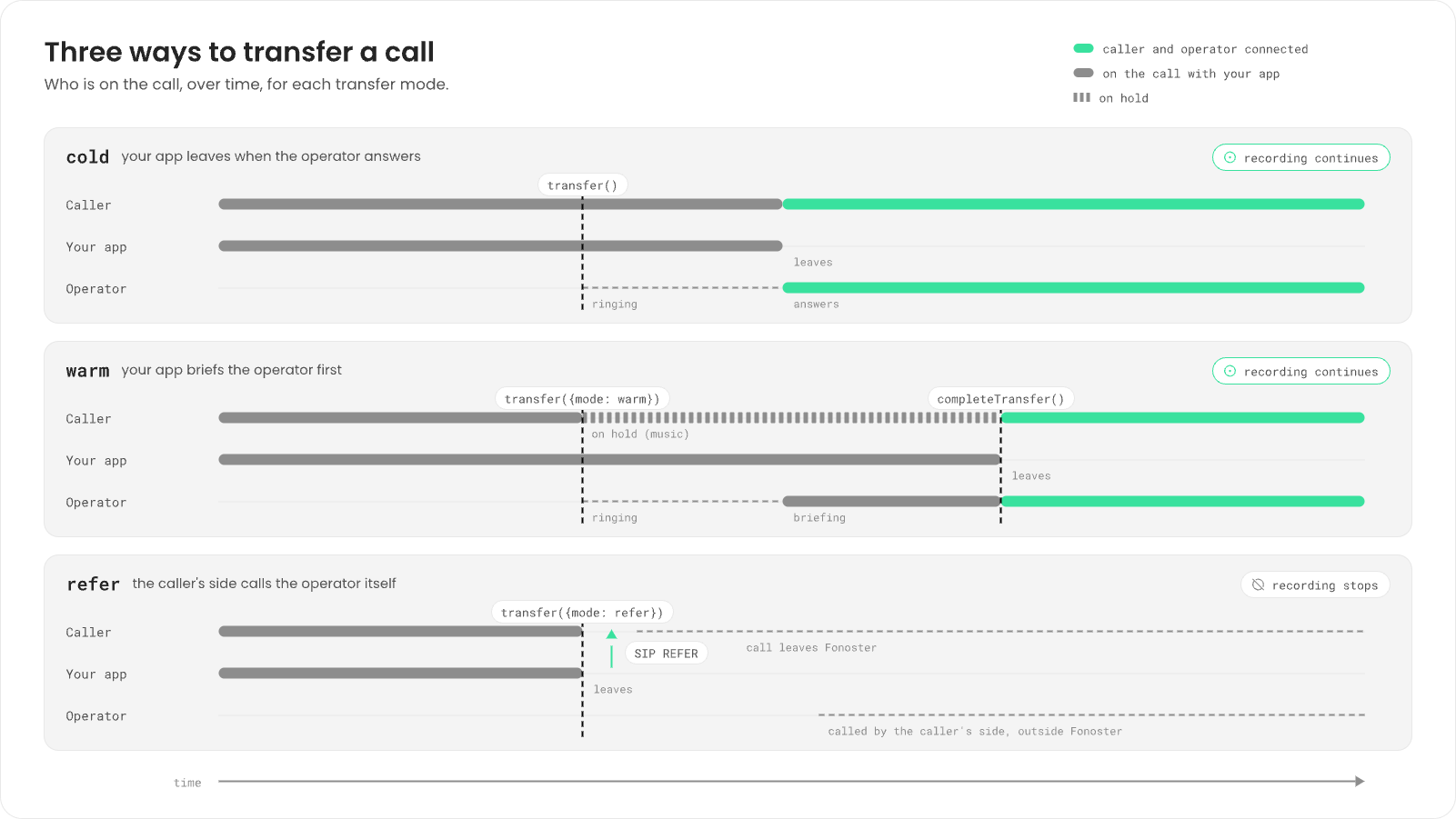
Use
cold for most transfers. Use warm when the operator should hear the context before they
take the call. Use refer only when your carrier supports SIP REFER and you want the call off
Fonoster after the transfer.
The operator can be:
- A phone number in E.164 format, such as
+18095550100. The call goes out through the trunk of the number the caller dialed (or, on an outbound call, the number you called from). - A SIP agent’s address, such as
sip:maria@acme.sip.fonoster.com. See SIP agents.
Transfer from an Autopilot agent
SettransferOptions on the agent: the operator’s number and what the agent says first. The model
can then call the built-in transfer tool. When it does, the agent says the message and makes a
cold transfer.
agent.yaml
Transfer from a stream
Calltransfer on the session. A cold transfer resolves when the operator answers and your session
ends:
transfer rejects with a SessionError whose code is
transfer_failed. The call goes on, so tell the caller and carry on:
Warm transfer
In a warm transfer, the caller hears hold audio while your application and the operator hear each other. Start the transfer without waiting on it, wait for the operator to answer, brief them, then callcompleteTransfer to connect the caller:
transfer waits until the session ends:
transfer.answered when the operator answers. completeTransfer before that is
refused with SessionError code transfer_not_answered: the caller stays on hold and you can call
it again after the event.
If the operator doesn’t answer within 30 seconds, the transfer fails with transfer_failed and the
caller is back with your application.
SIP REFER
Passmode: "refer". Your session ends once the caller’s side accepts the REFER:
Send data to the operator’s phone
Add custom SIP headers to tell the operator’s system who’s calling. Headers must start withX-,
and you can send up to 16:
Some headers are reserved for Fonoster, such as
X-App-Ref, X-Call-Ref and X-Dod-Number. A
transfer that sets one fails with bad_message.
Hold and resume
To put the caller on hold without transferring, for example while you look something up, callhold. Pass a music URL to play while they wait, or leave it out for silence:
resume, hangup, transfer and handoff work. Anything else, such
as say, fails with on_hold.
Check it
- Call your number, ask for a person, and check that the operator’s phone rings.
-
In a stream, listen for the session’s end. After a transfer, its reason is
transfer:
Next steps
SIP agents
Give operators a softphone to take transfers.
Give your agent tools
The
transfer tool and the others.Voice SDK reference
Every method and option.
Record calls
What gets recorded after a transfer.