

@fonoster/voice)
accepts that connection and gives you one session object per call.
Before you begin
You need:- A Fonoster account. Sign up at app.fonoster.ai, or use the dashboard of your own Fonoster install.
- A phone number in your workspace. Link a Twilio number if you don’t have one yet.
- Node.js 22 or later.
- A tunnel that gives your machine a public HTTPS address. This tutorial uses ngrok.
- A phone to call from.
Build it
1
Create the project
Make a folder for the server and install the Voice SDK:
2
Open a tunnel
Fonoster dials your server from the internet, so it needs a public address. It won’t dial
ngrok prints a public HTTPS address:Your stream’s URL is that address with
localhost or a private IP unless the operator of a self-hosted install allows it.Start a tunnel to port 3000, where your server will listen:wss:// in place of https://:
wss://f3a9-198-51-100-24.ngrok-free.app. Copy it.Keep ngrok running for the rest of this tutorial. On the free plan the address changes each
time you restart it, and then you must update the stream’s URL.
3
Create the stream
Tell Fonoster where your server is. When you create a stream, Fonoster gives you its
signing secret. Your server uses it to check that each connection really comes from
Fonoster.The stream uses the platform’s default voice (
- Dashboard
- SDK
- CLI
- Sign in to the dashboard and go to Streams.
- Choose New stream.
- Name it
Front desk stream. - Paste your
wss://address into URL. - Keep the protocol Fonoster.
- Choose Create stream.
deepgram/aura-2-thalia-en) and language
(en-US). You can change both later.You have a stream named Front desk stream and its signing secret.
4
Write the server
Save this as Each verb sends one command over the call’s WebSocket and waits for its result:
server.js. VoiceServer listens on port 3000 and runs handler once for each
call. The handler greets the caller, waits for an answer, and then transfers the call or says
goodbye:server.js
say(text)speaks with the stream’s voice and resolves when the caller has heard it.gather()resolves with{ speech }when the caller finishes talking, with{ digits }when they press keys, or with neither when the timeout passes.maxDigits: 1ends it on the first key.transfer(number)hands the call to the operator. The caller stays on the line and your session ends.hangup()ends the call.
OPERATOR to a phone you can answer if you want to try the transfer.5
Run it
Start the server with the signing secret and the same
wss:// address you gave the stream:VoiceServer refuses to start without a signing secret, and it rejects any connection that
Fonoster didn’t sign for PUBLIC_URL.6
Point your number at the stream
- Dashboard
- CLI
Go to Numbers and open your number. Under When this number is called, send it to,
choose Stream, then Front desk stream.
7
Call it
Call your number from your phone. You hear “Thanks for calling. Say sales or support, or press
0 to talk to a person.” Say “support”.Your terminal shows the call and what you said:The stream answers “You said support. We’ll call you back soon. Goodbye.” and hangs up.Call again and press 0. You hear “One moment. I’m connecting you.”, and the call rings
the operator’s number.
Your own code answered a phone call.
The call rings and then ends, or the server never logs a call
The call rings and then ends, or the server never logs a call
Fonoster tries your URL for about 2.5 seconds while the caller hears ringing. If it can’t
connect, the call goes to the stream’s fallback, or ends if there is none.
- Check that ngrok and
node server.jsare both running, and that the stream’s URL is the current ngrok address withwss://. - If the server logs
rejected a session connection, the signature didn’t match. Check thatAPP_SIGNING_SECRETis the stream’s secret and thatPUBLIC_URLis exactly the URL on the stream. See Verify request signatures.
What just happened
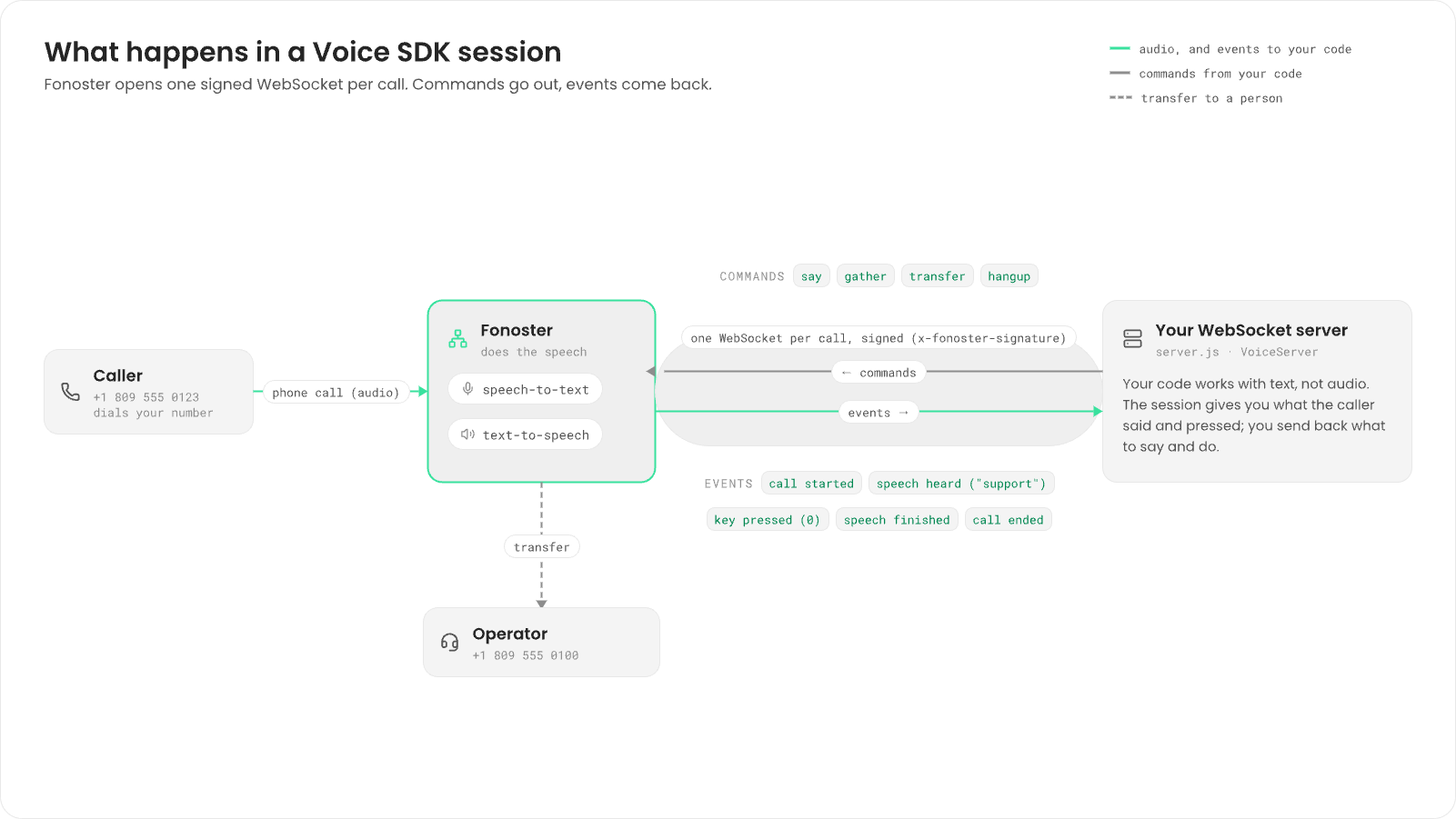
VoiceServer checked the signature and called your handler with a
session for that call.
From then on, the session carried messages both ways. Your code sent commands: speak this text,
transfer to that number, hang up. Fonoster sent back events: the speech finished playing, the
caller said “support”, the caller pressed 0. Fonoster did the speech-to-text and text-to-speech,
so your code worked with text, not audio.
When the call ended, Fonoster closed the WebSocket.
To see the messages on the wire, or to write a server without the SDK, read the
session protocol.
Next steps
Verify request signatures
How the signature works, and how to rotate the secret.
Use the Python Voice SDK
The same session in Python, standalone or inside FastAPI.
Transfer calls
Cold, warm and SIP REFER transfers.
Voice SDK reference
Every method, option and event, including barge-in and streaming text.