

Linking runs from the CLI. The dashboard doesn’t have a Twilio flow: once the number is linked,
you manage it under Numbers like any other.
Before you begin
You need:- A Twilio account with a voice-capable phone number in it. Note the number in E.164 format, such
as
+18095550123. - Your Twilio Account SID and Auth Token, from the Twilio console.
- An Autopilot agent or a stream to send calls to. See Build an Autopilot agent or Build a stream with the Voice SDK.
- Node.js 22 or later.
Link the number
1
Install the CLI and log in
In the dashboard, go to API keys and create a key. Then install the
fonoster CLI and log
in to your workspace with the key ID and secret:2
Run the link command
Start the command:It asks for:
Confirm with Ready?. The command returns when everything is set up.
3
Check the number
List your numbers. The linked number is there, on a trunk named Twilio Trunk, pointing at
the application you picked:Call the number from any phone. Your agent or stream answers.
Your Twilio number rings in Fonoster.
What the command sets up
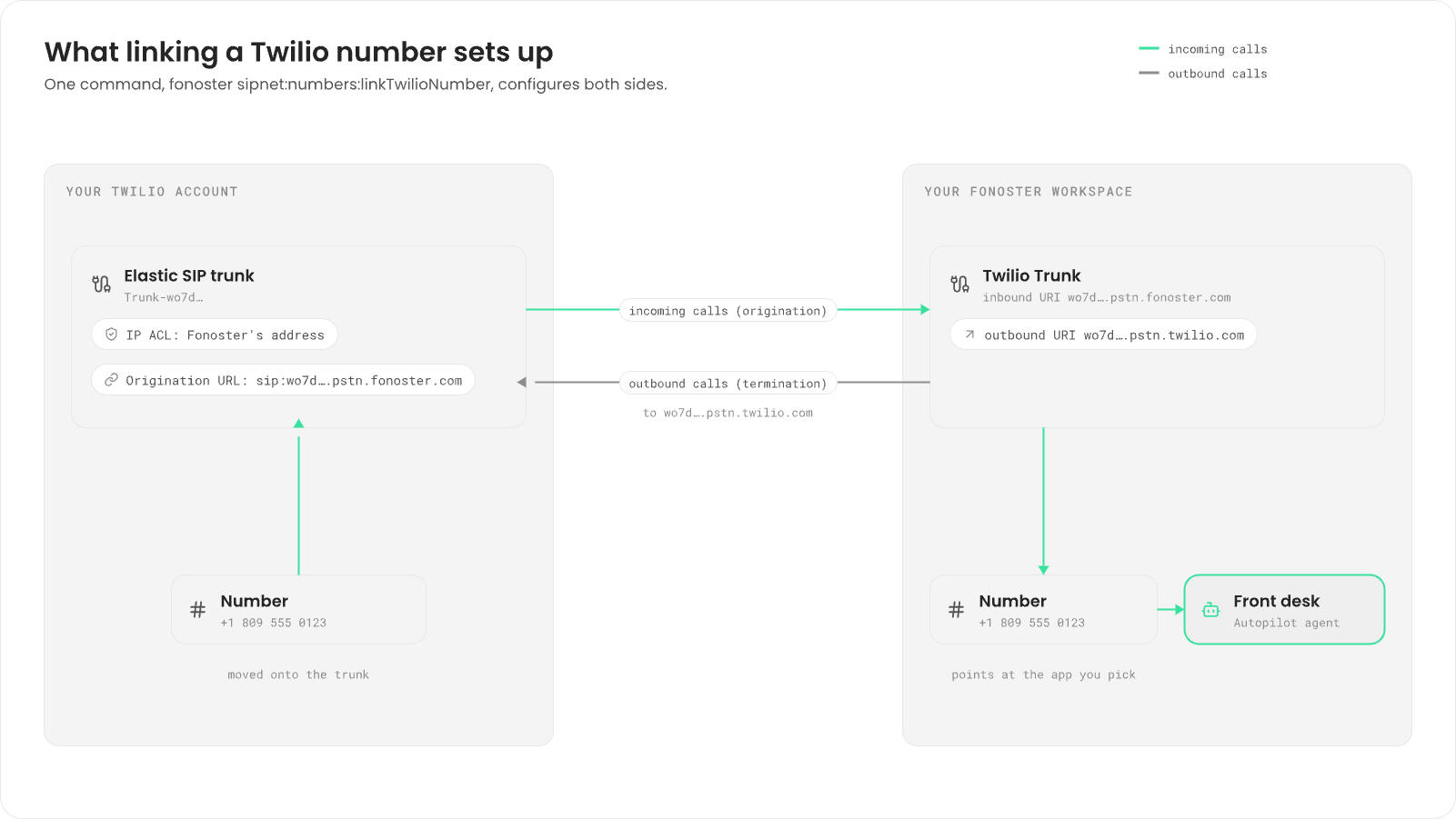
The command changes both your Twilio account and your Fonoster workspace. It names everything after your workspace’s access key ID in lowercase, shown here aswo7d2kq9x4m1c8b3n6p0r5t2v9y4z7a1e3.
- An Elastic SIP trunk named
Trunk-<access key ID>, with the termination domain<access key ID>.pstn.twilio.com. Fonoster sends your outbound calls there. - An IP access control list named
ACL-<access key ID>on that trunk, holding Fonoster’s signaling address. Twilio only accepts outbound calls from addresses on this list. - An origination URL
sip:<access key ID>.pstn.fonoster.comon the trunk. Twilio sends calls to your number there. - Your number moves onto the trunk. Twilio then sends its calls over SIP, not to the number’s voice webhook.
- A trunk named Twilio Trunk, with the inbound URI
<access key ID>.pstn.fonoster.comand an outbound URI pointing at the Twilio termination domain. - The number, on that trunk, pointing at the application you picked.
Change where calls go
The linked number is a normal number in your workspace. To send its calls somewhere else, go to Numbers, open it, and pick a new destination under When this number is called, send it to. See Numbers and routing.On your own install
On a self-hosted Fonoster, Twilio has to reach your servers, not Fonoster Cloud. Pass two flags:Troubleshooting
- “The number … was not found in your account.” The number isn’t in the Twilio account whose SID you entered. Check the account and the E.164 format.
- The number rings but nothing answers. Check that the number points at an application under Numbers.
- Outbound calls fail. Twilio rejects calls from addresses outside the trunk’s access control
list. On your own install, check the
--access-control-listyou passed.
Next steps
Numbers and routing
Send each number to the right agent, stream or SIP agent.
Make outbound calls
Call people from your Twilio number.
Connect a SIP trunk
Use another carrier.
Bring your Twilio or Pipecat app
Run a bot built for Twilio Media Streams on Fonoster.