

credentialRef, such as
deepgram-default), and the key comes from the workspace or from your configuration. See
Platform keys and workspace keys.
Before you begin
You need Fonoster installed with Docker Compose. See Install with Docker Compose. Run the commands on this page from yourfonoster folder.
How the catalog is stored
The catalog lives in the API server’s database. Two things change it:config/catalog.yaml: the API server applies this file on every start. It adds the entries the file lists and updates the ones that differ. It never removes an entry the file doesn’t list.fonoster-registry: the operator tool. It adds entries, deprecates and retires them, reports who uses them, and compares or applies catalog files.
Run the tool
fonoster-registry ships in the API server’s image. Define a shell function that runs it there,
against the install’s database:
provider.deprecated
webhook. Without it, the tool stores the notices and prints
note: no webhooks sent (set FONOSTER_REGISTRY_ENCRYPTION_KEY); notices were stored.
List the models to check it works:
registry list with no argument lists everything, and registry list provider or
registry list voice narrows it. registry show <id> prints one entry as JSON.
Add a model or voice
Add a model with its type, the features it supports, its languages and the settings it accepts:--models takes one or more model IDs:
<provider>/<vendor's name>: the model or voice name exactly as the vendor’s API
takes it. An ID that already exists is refused with catalog id <id> already exists.
Features decide which apps a model can serve:
An agent with tools needs a language model with
tool-calling, and the dashboard greys out the
others. --settings lists the vendor settings the model accepts. When a model is retired, settings
its replacement doesn’t accept are dropped.
Add only models Fonoster can run. Speech runs on Deepgram and ElevenLabs, and Autopilot’s language
models on OpenAI-compatible providers (OpenAI, Groq, Ollama). To add a provider
or its keys, see Install with Docker Compose.
The tool refuses keys. Write commands accept only their own options, so
--api-key fails with
unknown option: --api-key, and a value that looks like a key is refused with a pointer to
--credential-ref.Phase out a model or voice
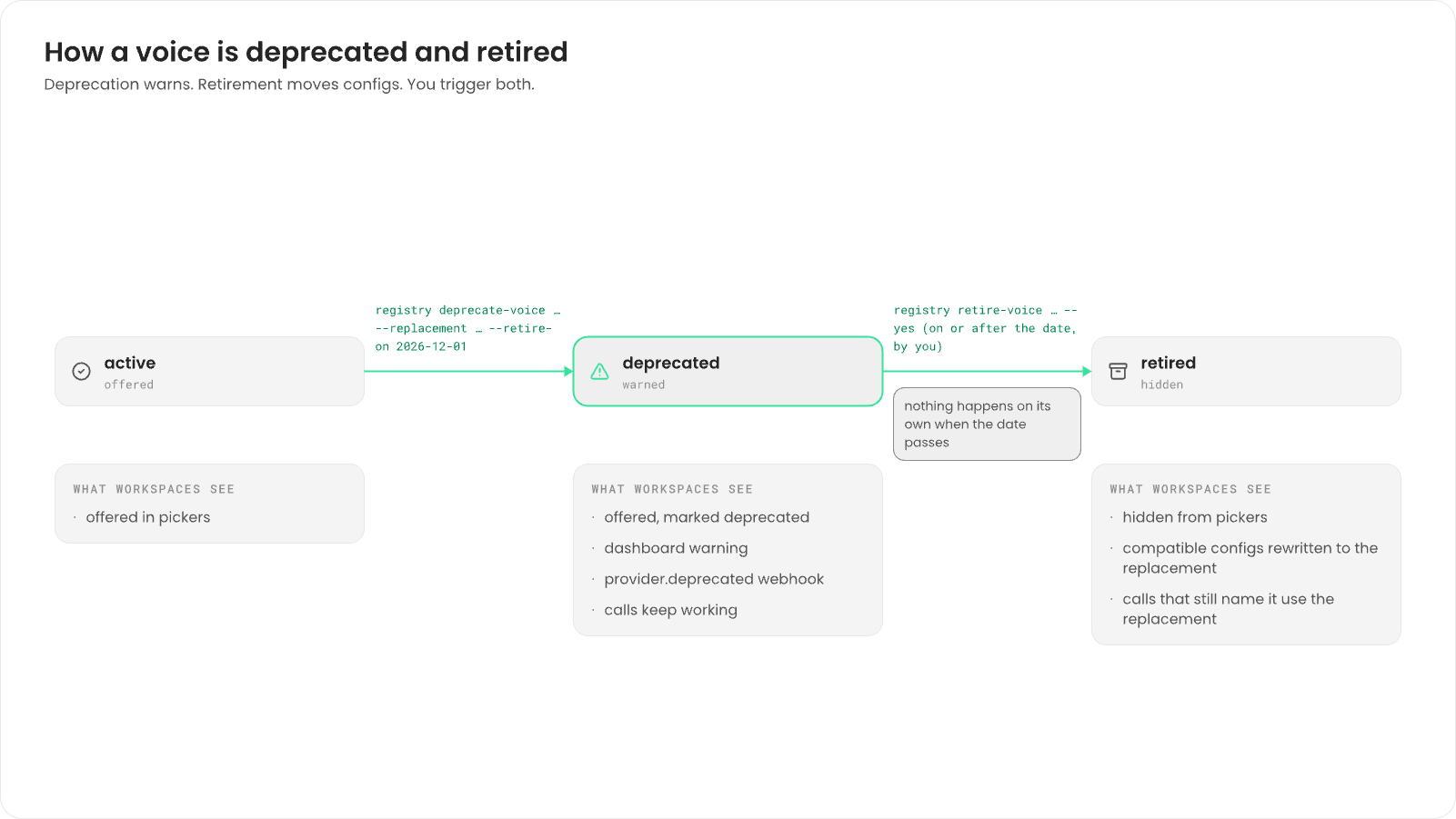
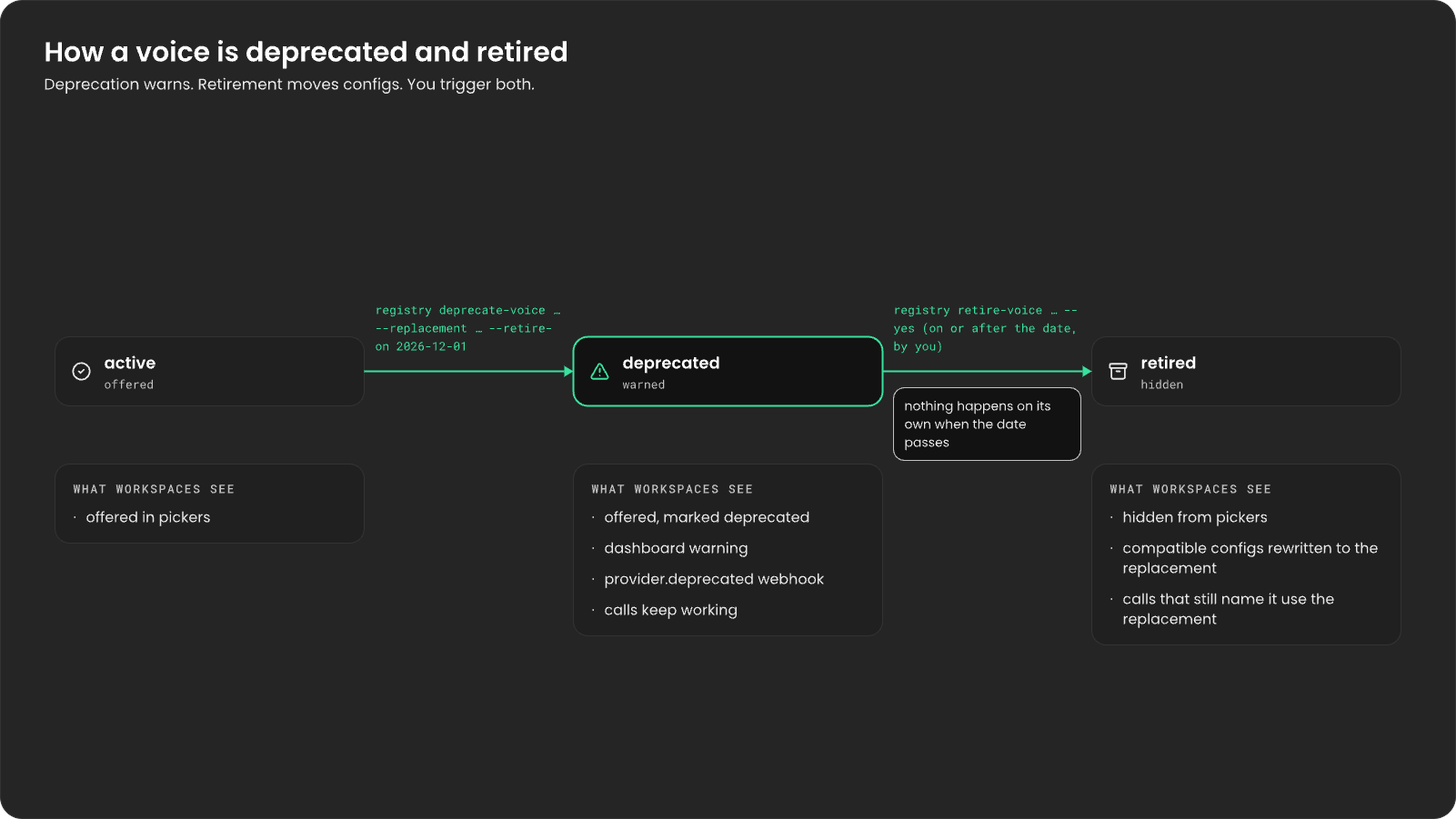
You never remove a catalog item. You deprecate it with a replacement and a date, give workspaces time to move, then retire it yourself. Nothing happens on its own when the date passes.1
Make sure the replacement is active
The replacement must be an
active item of the same kind. For a model, it must also be the
same type (stt, tts or llm). Add it first if it’s new.2
Deprecate the item
Give the replacement and the date you plan to retire it:It prints the impact, one line per kind of effect with the number of apps:
For a
✗ voice line, the output names the --voice-map you’ll need at retirement.3
Watch who still uses it
Check usage as the date approaches:For each workspace, it prints the calls that used the item in the last 30 days, then each app
or agent that names it:
4
Retire the item
On or after the date, run the retirement without When the impact looks right, run it again with Every config that can move is rewritten to the replacement. Configs marked
--yes first. It only prints what would
change, then exits with code 1:--yes:✗ keep the old ID.
When you retire a model whose voices don’t exist on the replacement, map each voice by its
name, without the provider:5
Save the catalog to the file
Write the catalog back to
config/catalog.yaml so the next start keeps your change. See
Save the catalog to the file.registry list voice (the item now shows retired) and
registry history deepgram/aura-2-asteria-en, which prints every change to the item, newest first,
with the time and who made it.
What workspaces see
A workspace’s warning goes away once none of its apps or agents use the item. Developers can
subscribe to
provider.deprecated to learn about a deprecation without opening the dashboard. See
Webhooks.
Save the catalog to the file
After you change the catalog with the tool, export it overconfig/catalog.yaml:
export prints the whole catalog as YAML, sorted, without keys. Two equal catalogs export
byte for byte the same. The export drops the comments in the shipped file.
Keep several installs on the same catalog
Treat one exported file as the source of truth and keep it in version control. On another install, see what applying it would change, then apply it. The file goes in through standard input:plan prints one line per change, such as + add model openai/gpt-4.1-mini or
~ deprecate voice deepgram/aura-2-asteria-en → deepgram/aura-2-thalia-en, or no changes.
Platform keys and workspace keys
A call gets its vendor key from the first of these that has one:- The workspace’s own key for the provider, added in the dashboard. See Use your own vendor keys.
- The install’s platform key: the key your configuration gives the provider’s
credentialRef.
Next steps
Install with Docker Compose
Give your install platform keys for speech and language models.
Providers and models
What developers see in the catalog.