

config/gateway.yaml.
Before you begin
You need Fonoster installed with Docker Compose. See Install with Docker Compose. Run the commands on this page from yourfonoster folder.
Apply a change
Each section below editsconfig/gateway.example.yaml. After you edit it, write the configuration
and recreate the voice gateway:
Set the default recording policy
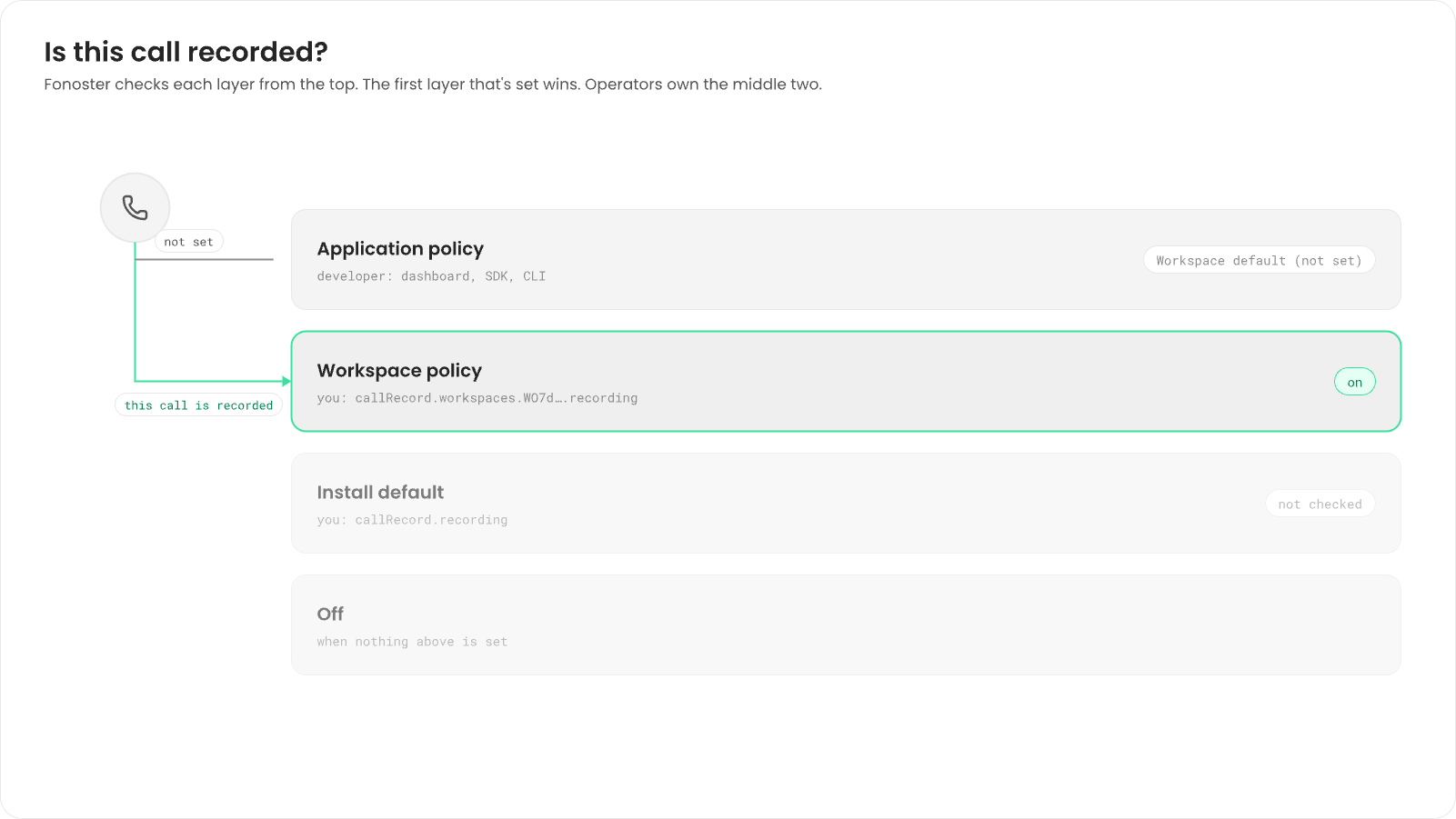
A call is recorded by the first policy that’s set, in this order:- The application’s policy, set by the developer. See Record calls and ask for consent.
- The workspace’s policy, set by you.
- The install’s default, set by you.
off.
off, on or consent. With consent, the caller hears a short prompt before
recording starts.
1
Set the install's default
Under
callRecord, set recording. The Compose install ships with off:2
Set a workspace's policy (optional)
Under That workspace’s applications left on Workspace default are now recorded. Applications
with their own policy keep it.
callRecord, add workspaces, keyed by the workspace’s ID (WO…). The dashboard shows
it as Access key ID under Settings:3
Change the consent prompt (optional)
The prompt is “This call will be recorded.” by default. Set your own words under The prompt is the same for every application, in the application’s own voice. It isn’t
translated, so write it in your callers’ language.
callRecord:4
Apply it
Write the configuration and recreate the gateway, as in Apply a change.
Make a test call to an application left on Workspace default. With
on, its call record has
a recording. With consent, you hear the prompt first.off, on or consent. To catch a typo
first, run npx -p @fonoster/common fonoster-config check.
Turn detection
The gateway decides when the caller has finished speaking with a turn detector. Every application in the Compose install uses the default detector,baseline: voice activity, final
transcripts and a silence timer. Developers tune it per application with patience. See
Turn-taking and barge-in.
The gateway also has other detectors:
The detector is set per application, with
speech.detector, only for applications listed in the
gateway’s own file. The Compose install keeps applications in its database, so the dashboard and
the API create them, and they always use baseline. There’s no install-wide setting for the
detector.
Audio filters
Applications can turn on noise cancelling (see Cancel background noise). The filter runs in AppBridge on the caller’s audio before speech recognition and turn detection, and it needs a noise-cancelling provider in the catalog with a key. Register the provider once, with the capabilitync:
appbridge.yaml:
Next steps
Record calls and ask for consent
How developers set the policy per application.
Rotate call-record keys
Manage the key that signs your call records.