

fonoster.local, which works only on your own
network. Use this page to put your SIP names under a domain you own, so carriers can send calls to
your trunks and softphones can register from anywhere.
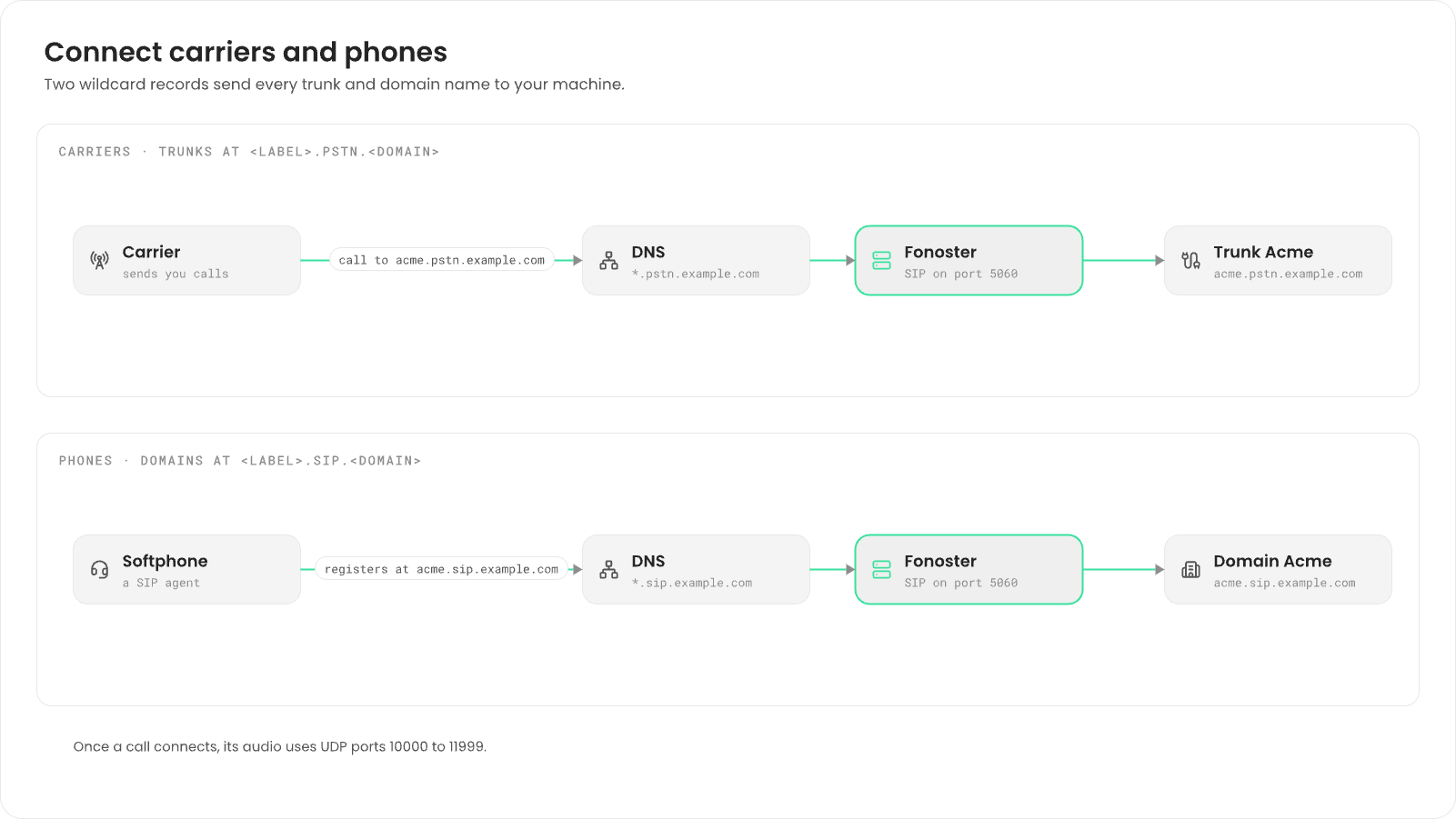
domain, the way Twilio does:
The dashboard asks only for the label and adds the rest. The API rejects any other name.
Before you begin
You need:- Fonoster 0.31.1 or later, installed with Docker Compose. See Install with Docker Compose.
- A domain whose DNS you can edit, such as
example.com. HOST_IPin.envset to the address carriers and phones reach this machine at.initdetects it; check it withnpx -p @fonoster/common fonoster-config info.
fonoster folder.
Set your domain
1
Write an override
Put your domain in Don’t edit
config/overrides/fonoster.yaml. init merges this file over the
config/fonoster.yaml it writes, so your domain survives later runs and upgrades:config/fonoster.yaml itself: the next init or upgrade puts fonoster.local back.2
Apply it
Write the configuration again and recreate the API server, which reads the domain when it
starts:New trunks in the dashboard now end in
.pstn.example.com, and new domains in
.sip.example.com.Trunks and domains you created before keep their old names. Edit each one to
the new form, for example
acme.pstn.fonoster.local to
acme.pstn.example.com. You don’t need to recreate them.Point your names at this machine
Add two wildcard records in your DNS, so every new trunk and domain resolves without a new record:
Check that a name under each one resolves:
Open the ports
Carriers and phones need these ports open in any firewall in front of this machine, such as your cloud provider’s:
With
ufw on the machine itself:
On Linux, turn off Docker’s userland proxy, or the 2,000 published audio ports
exhaust the machine’s memory. See Before you
begin in the install guide.
More options
Accept any host or IP address
Accept any host or IP address
If your carriers and phones reach you by IP address, or you can’t add wildcard records, accept
any name instead. Add this to The dashboard then asks for the full name instead of a label.
config/overrides/fonoster.yaml, then run init and recreate
the API server:config/overrides/fonoster.yaml
SIP over TLS
SIP over TLS
To accept SIP over TLS on port
5061, see SIP over TLS.